
It sounds like county IT directors have found an effective solution to a common problem with PDF forms on government websites. Let me break down what’s happening and why this approach makes sense:
The Problem
- County websites rely heavily on PDF forms for various services
- Adobe Reader no longer functions as a plugin in modern browsers
- PDF forms don’t work well on mobile devices
- This creates frustration for both citizens and county employees
The Solution
County IT directors are using FormRouter tools to:
- Transform existing PDF forms into HTML5 versions
- Maintain the original look and feel of the forms
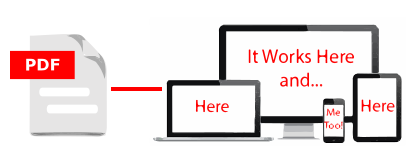
- Enable form completion on all devices (desktop and mobile)
- Securely capture submitted data & PDF forms into familiar database systems:
- Excel
- Access
- SQL Server
- SharePoint
See an Example PDF Form Converted on the Fly
Example Implementation:
County Payment Plan Agreement Request Form
Before:
- The county used a multi-page PDF Payment Plan Agreement Request Form
- Users struggled with Adobe Reader not working with their web browser
- Form fields were not required and were often left blank
- Mobile users (often on-the-go) couldn’t access the form
- Staff spent significant time re-entering data from printed forms
- Sensitive information privacy was a concern
After HTML5 Conversion & Response Capture:
- The form maintains its official appearance but works in any web browser
- Enhanced security features protect sensitive information
- Built-in validation ensures all required fields are completed
- Users receive immediate confirmation when forms are submitted
- Data flows directly into a county-controlled database (Access , Excel, SQL Server, SharePoint etc.)
- Department reports faster processing times
- Compliance with record-keeping requirements improved
The Benefits
- Citizens can easily complete forms on any device
- Counties maintain complete control over their data
- Implementation costs are kept down
- No need to redesign existing forms
- Seamless integration with existing database infrastructure
This approach represents a practical solution that bridges the gap between legacy PDF forms and modern web technologies without requiring extensive redesign or new database systems. It’s a good example of pragmatic IT leadership addressing usability issues while working within existing constraints.
Enable your PDF forms to work in all Web Browsers
FormRouter has a service that renders PDF forms in all major Web Browsers (Chrome®, Safari®, Firefox® and IE) on all major devices (PCs, MACs, iPads®, iPhones®, Android® Tablets and Phones).

Recent Comments